Coordinator Daemon
The AILANG Coordinator is an always-on daemon that automatically processes incoming tasks using AI agents (currently Claude Code) with human-in-the-loop approval workflows.
Overview
The coordinator watches for messages across multiple inboxes, routes them to configured agents, and executes tasks in isolated git worktrees. This enables:
- Multi-agent workflows - Chain agents together (design → plan → execute)
- Human-in-the-loop approvals - Review work before merging
- Isolated environments - Each task gets its own git worktree
- Agent-to-agent handoffs - Session continuity across agents
- GitHub integration - Auto-import issues as tasks
- Real-time dashboard - Watch execution progress live
Quick Start
# 1. Start both services
make services-start

# 2. Open dashboard
open http://localhost:1957

# 3. Send a task
ailang messages send coordinator "Fix the bug in parser.go" \
  --title "Bug: Parser error" --from "user"

# 4. Watch it execute in the dashboard
Agent Configuration
Agents are configured in ~/.ailang/config.yaml. Each agent has an inbox, workspace, and can trigger other agents on completion.
Example Configuration
# ~/.ailang/config.yaml

coordinator:
  default_provider: claude  # claude | codex | motoko | opencode | pi | managed_agents
                            # (the Gemini CLI provider was retired in v0.22.0).
                            # The examples below are a LOCAL coordinator; the cloud fleet pins pi.

  agents:
    # Design Doc Creator - reads GitHub issues, creates design docs
    - id: design-doc-creator
      label: "Design Doc Creator"
      inbox: design-doc-creator
      workspace: /path/to/project
      capabilities: [research, docs]
      provider: claude
      trigger_on_complete: [sprint-planner]  # Chain to next agent
      auto_approve_handoffs: false           # Human reviews before handoff
      auto_merge: false                      # Human reviews changes
      session_continuity: true               # Use --resume for Claude Code
      max_concurrent_tasks: 1

    # Sprint Planner - creates sprint plans from design docs
    - id: sprint-planner
      label: "Sprint Planner"
      inbox: sprint-planner
      workspace: /path/to/project
      capabilities: [research, docs, planning]
      provider: claude
      trigger_on_complete: [sprint-executor]
      auto_approve_handoffs: false
      auto_merge: false
      session_continuity: true
      max_concurrent_tasks: 1

    # Sprint Executor - implements approved sprint plans
    - id: sprint-executor
      label: "Sprint Executor"
      inbox: sprint-executor
      workspace: /path/to/project
      capabilities: [code, test, docs]
      provider: claude
      trigger_on_complete: []  # End of chain
      auto_approve_handoffs: false
      auto_merge: false
      session_continuity: true
      max_concurrent_tasks: 1

    # General Coordinator - handles ad-hoc tasks
    - id: coordinator
      label: "General Coordinator"
      inbox: coordinator
      workspace: /path/to/project
      capabilities: [code, test, docs, research]
      provider: claude
      max_concurrent_tasks: 2

  # GitHub issue import configuration
  github_sync:
    enabled: true
    interval_secs: 300              # Check every 5 minutes
    watch_labels: []                # Empty = import all issues
    target_inbox: design-doc-creator
Agent Configuration Fields
| Field | Type | Description |
|---|---|---|
id | string | Unique agent identifier |
label | string | Human-readable name |
inbox | string | Message inbox to watch |
workspace | string | Base directory for worktrees |
capabilities | list | Agent capabilities (code, test, docs, research, planning) |
provider | string | Executor: claude, codex, motoko, opencode, pi, managed_agents (the Gemini CLI provider was retired in v0.22.0) |
trigger_on_complete | list | Agent IDs to trigger when this agent completes |
auto_approve_handoffs | bool | Skip approval for agent-to-agent handoffs |
auto_merge | bool | Automatically merge approved changes |
session_continuity | bool | Use --resume (Claude) or --conversation-id (Gemini) |
max_concurrent_tasks | int | Maximum concurrent tasks (0 = unlimited) |
invoke | object | How to invoke this agent (skill/agent/prompt) - v0.6.3+ |
output_markers | list | Markers to extract from output - v0.6.3+ |
approval | object | Approval workflow configuration - v0.6.3+ |
plugin_dirs | list | Local plugin directories passed as --plugin-dir to Claude CLI - v0.9.1+ |
plugins | object | Third-party plugin installation config (marketplaces + install) - v0.9.1+ |
model | string | Model override for the chosen executor — an executor-native name ("opus", "gpt-5.6-sol") or an OpenRouter id ("openrouter/z-ai/glm-5.3-flash", what most of the fleet pins) - v0.8.0+ |
timeout | string | Hard ceiling timeout (e.g., "30m", "1h"). Default: 60m - v0.8.1+ |
idle_timeout | string | Kill if no output for this long. Default: 3m - v0.8.1+ |
effort | string | Claude Code effort level: "low", "medium", "high" |
executor_variant | string | Which container image variant runs the job (pi, codex, …) — the cloud dispatcher picks the Cloud Run Job from it |
tool_policy | string | ailang_only restricts the agent to read/edit/write + ailang_check/ailang_run/builtins_search/examples_search/ailang_cli — no shell. Absent = the executor's full tool set |
policy_path | string | The operator policy ailang_run admits programs against (caps, fs_sandbox, process_allow, net_allow, cli_allow). Required for tool_policy: ailang_only to be useful |
artifact_patterns | list | Globs bounding what a merge may land. Declared patterns gate auto-merge and the PR reconciler; leaving it unset defaults to **/*, which bounds nothing |
merge_branch | string | The branch the wrapper clones and targets (e.g. main); defaults to the repo default |
subdirectory | string | Scopes the agent's CWD to a package inside a monorepo |
What the production fleet actually runs (2026-09-17): 41 agents — 38 pi, 2 codex,
1 motoko, and no claude. Six are on tool_policy: ailang_only, the lane where an agent
executes programs only by submitting AILANG source to a policy it cannot edit; that lane is
the default shape for new agents. Its full contract — the gate, the ailang_run tool, the
policy file, what cli_allow admits — is
Agent tool policy. The registry the cloud plane actually reads is
ailang-multivac/config/config.cloud.yaml, not this machine's ~/.ailang/config.yaml;
ailang coordinator agents prints the live one and names its source.
Generic Workflow Configuration (v0.6.3+)
The coordinator supports fully configurable workflows, allowing any project to define custom skills, stages, and approval rules without code changes.
Invoke Configuration
Specifies how an agent executes its tasks:
# Invoke a Claude Code skill
invoke:
  type: skill
  name: design-doc-creator  # Skill name (from .claude/skills/)

# Hand off to another agent
invoke:
  type: agent
  name: sprint-planner      # Target agent ID

# Use custom prompt template
invoke:
  type: prompt
  template: |
    Task {{.TaskID}} for issue #{{.GithubIssue}}:
    {{.Content}}

    When done, output: RESULT: <value>

# Execute a deterministic script (v0.6.4+)
invoke:
  type: script
  command: "./scripts/run_eval.sh"   # Script path or inline command
  shell: /bin/bash                    # Shell to use (default: /bin/sh)
  env_from_payload: true              # Convert JSON payload to env vars
  timeout: "30m"                      # Execution timeout
  working_dir: "{{.Workspace}}"       # Working directory
Script Invoke Type (v0.6.4+)
The script invoke type enables deterministic workflow execution without AI inference. This is useful for:
- Eval runners - Execute benchmarks with consistent behavior
- Data pipelines - Transform data without AI variability
- Infrastructure tasks - Run deployment scripts
- Cost optimization - $0.00 execution cost for deterministic tasks
JSON Payload to Environment Variables:
When env_from_payload: true, the task's JSON content is converted to environment variables:
{
  "model": "gpt5",
  "benchmark": "fizzbuzz",
  "db": {
    "host": "localhost",
    "port": 5432
  }
}
Becomes:
MODEL=gpt5
BENCHMARK=fizzbuzz
DB_HOST=localhost
DB_PORT=5432
Auto-injected variables:
AILANG_TASK_ID- Coordinator task IDAILANG_MESSAGE_ID- Source message IDAILANG_WORKSPACE- Worktree path
Example: Echo Demo Agent
A demo script is included at scripts/coordinator/echo_payload.sh that echoes back all payload variables:
coordinator:
  agents:
    - id: echo-demo
      label: "Echo Demo"
      inbox: echo-demo
      workspace: /path/to/project
      invoke:
        type: script
        command: "./scripts/coordinator/echo_payload.sh"
        env_from_payload: true
        timeout: "1m"
      output_markers:
        - "ECHO_COMPLETE:"
      trigger_on_complete: []
Test the demo:
# Send a JSON payload to the echo-demo agent
ailang messages send echo-demo '{"model": "gpt5", "benchmark": "fizzbuzz", "config": {"parallel": true}}' \
  --title "Echo test" --from "user"
Expected output:
AILANG Script Invoke Demo
Task Context:
  AILANG_TASK_ID:     task-xxx
  AILANG_MESSAGE_ID:  msg-xxx
  AILANG_WORKSPACE:   /path/to/worktree

Payload Variables (from JSON):
  BENCHMARK=fizzbuzz
  CONFIG_PARALLEL=true
  MODEL=gpt5

ECHO_COMPLETE: true
Production Example: Eval Runner
coordinator:
  agents:
    - id: eval-runner
      label: "Eval Runner"
      inbox: eval-runner
      workspace: /path/to/project
      invoke:
        type: script
        command: "./scripts/run_eval.sh"
        env_from_payload: true
        timeout: "1h"
      output_markers:
        - "EVAL_COMPLETE:"
        - "RESULTS_PATH:"
      trigger_on_complete: []
Mixed pipelines work seamlessly - you can chain AI agents with script agents:
design-doc-creator (AI) → sprint-planner (AI) → eval-runner (Script)
Output Markers
Markers to extract from execution output for stage completion:
output_markers:
  - "DESIGN_DOC_PATH:"
  - "SPRINT_PLAN_PATH:"
  - "IMPLEMENTATION_COMPLETE:"
Approval Configuration
Custom labels for GitHub approval workflow:
approval:
  needs_label: needs-design-approval     # Label when awaiting review
  approved_label: design-approved        # Label that triggers next stage
  github_comment_template: |             # Comment posted on completion
    ## Design Document Ready
    Path: {{.DesignDocPath}}
Plugin Configuration (v0.9.1+)
Agents can use plugins to access cross-project skills that aren't in the project's .claude/skills/ directory.
Plugin directories — local paths to Claude Code plugins:
# Agent uses local plugin directory
- id: website-builder
  plugin_dirs:
    - /path/to/ailang_bootstrap  # Contains .claude-plugin/plugin.json
  invoke:
    type: skill
    name: "ailang:website-builder"  # Plugin-namespaced skill
Third-party plugins — install from marketplace before execution:
# Agent installs third-party plugins
- id: frontend-agent
  plugins:
    marketplaces:
      - anthropics/claude-code        # Register marketplace
    install:
      - frontend-design@anthropics-claude-code  # Install plugin
Cloud plugin repo — cloned at Cloud Run Job start:
coordinator:
  # Cloned into /plugins/{taskID}/ailang_bootstrap and passed as --plugin-dir
  plugin_repo: https://github.com/sunholo-data/ailang_bootstrap.git
The cloud executor also injects AGENTS.md from the plugin into the workspace if the repo doesn't already have one.
How plugins are resolved:
| Mode | Source | Mechanism |
|---|---|---|
| Local | plugin_dirs in agent config | --plugin-dir flags to Claude CLI |
| Local | plugins.install in agent config | claude plugin install before execution |
| Cloud | plugin_repo in coordinator config | AILANG_PLUGIN_REPO env var → git clone → --plugin-dir |
| Cloud | Dockerfile pre-clone | ARG AILANG_PLUGIN_REPO → faster cold starts |
Full Example with Generic Workflow
coordinator:
  agents:
    - id: design-doc-creator
      label: "Design Doc Creator"
      inbox: design-doc-creator
      workspace: /path/to/project
      capabilities: [research, docs]
      provider: claude

      # NEW: Generic workflow config (v0.6.3+)
      invoke:
        type: skill
        name: design-doc-creator
      output_markers:
        - "DESIGN_DOC_PATH:"
      approval:
        needs_label: needs-design-approval
        approved_label: design-approved
        github_comment_template: "design_doc"

      trigger_on_complete: [sprint-planner]
      auto_approve_handoffs: false

    - id: sprint-planner
      label: "Sprint Planner"
      inbox: sprint-planner
      workspace: /path/to/project
      capabilities: [planning]
      provider: claude
      invoke:
        type: skill
        name: sprint-planner
      output_markers:
        - "SPRINT_PLAN_PATH:"
        - "SPRINT_JSON_PATH:"
      approval:
        needs_label: needs-sprint-approval
        approved_label: sprint-approved
      trigger_on_complete: [sprint-executor]

    - id: sprint-executor
      label: "Sprint Executor"
      inbox: sprint-executor
      workspace: /path/to/project
      capabilities: [code, test]
      provider: claude
      invoke:
        type: skill
        name: sprint-executor
      output_markers:
        - "IMPLEMENTATION_COMPLETE:"
        - "BRANCH_NAME:"
        - "FILES_CREATED:"
        - "FILES_MODIFIED:"
      approval:
        needs_label: needs-implementation-approval
        approved_label: implementation-approved
      trigger_on_complete: []
Backwards Compatibility
Agents without explicit invoke, output_markers, or approval config will use legacy defaults for known AILANG agent IDs:
design-doc-creator: skill invocation,DESIGN_DOC_PATH:marker,design-approvedlabelsprint-planner: skill invocation,SPRINT_PLAN_PATH:marker,sprint-approvedlabelsprint-executor: skill invocation,IMPLEMENTATION_COMPLETE:marker,implementation-approvedlabel
Note: Legacy defaults are deprecated and will be removed in v0.7.0. New agents should always use explicit configuration.
Workflow Pipelines
The coordinator supports chained agent workflows where one agent's output triggers another.
Example: Issue to Implementation
Approval Gates
Each agent can require human approval before proceeding. The approval system uses a unified approval model (v0.6.5+) where merge and handoff are combined into a single approval action.
Configuration Options
# Combined approval (recommended) - Single approval covers merge + handoff
auto_approve_handoffs: false
auto_merge: false
# Creates: merge_handoff approval type
# Human reviews once → merge + handoff triggered together

# Auto-approve handoffs - Handoff triggers immediately after merge approval
auto_approve_handoffs: true
auto_merge: false
# Creates: merge approval type only
# Human reviews code → merge → handoff auto-triggers

# Fully autonomous (dangerous!)
auto_approve_handoffs: true
auto_merge: true
# No approvals required - agent chain runs automatically
Session Continuity
When session_continuity: true is set:
- Handoffs: Next agent receives
session_idand can use--resume(Claude) or--conversation-id(Gemini) - Rejections: Same agent retries with same
session_id, preserving full conversation history - Worktrees: Same git worktree is reused across iterations
This means agents can "pick up where they left off" with full context of previous work.
GitHub Integration
The coordinator can automatically import GitHub issues as tasks.
Configuration
coordinator:
  github_sync:
    enabled: true
    interval_secs: 300           # Check every 5 minutes (minimum)
    watch_labels: [bug, feature] # Filter by labels (empty = all)
    target_inbox: design-doc-creator
Manual Import
# Import all issues
ailang messages import-github

# Import with label filter
ailang messages import-github --labels bug,feature

# Dry run (preview only)
ailang messages import-github --dry-run
Issue → Message Mapping
| GitHub Issue Field | Message Field |
|---|---|
| Title | title |
| Body | content |
| Labels (bug, feature) | type |
| Issue number | github_issue_number |
GitHub-Driven Approval Workflow (v0.6.2+)
The coordinator supports a fully GitHub-driven workflow where all approvals happen via GitHub labels. This enables:
- Familiar tooling - Review everything in GitHub's UI
- Mobile-friendly - Approve from GitHub mobile app
- Audit trail - All approvals tracked in issue history
- Team collaboration - Multiple reviewers can participate
How It Works
GitHub Issue Created
       ↓
Coordinator imports issue → TaskChain starts
       ↓
┌─────────────────────────────────────────────────────────────┐
│  DESIGN STAGE                                                │
│  • Agent creates design doc                                  │
│  • Comment posted with full design doc content               │
│  • Label added: needs-design-approval                        │
│  • Human reviews design in GitHub                            │
│  • Human adds label: design-approved                         │
│  • ApprovalWatcher detects → advances to next stage          │
└─────────────────────────────────────────────────────────────┘
       ↓
┌─────────────────────────────────────────────────────────────┐
│  SPRINT STAGE                                                │
│  • Agent creates sprint plan                                 │
│  • Comment posted with full sprint plan content              │
│  • Label added: needs-sprint-approval                        │
│  • Human reviews plan in GitHub                              │
│  • Human adds label: sprint-approved                         │
│  • ApprovalWatcher detects → advances to next stage          │
└─────────────────────────────────────────────────────────────┘
       ↓
┌─────────────────────────────────────────────────────────────┐
│  IMPLEMENTATION STAGE                                        │
│  • Agent implements the sprint plan                          │
│  • Comment posted with file changes summary                  │
│  • Label added: needs-merge-approval                         │
│  • Human reviews changes (can check worktree)                │
│  • Human adds label: merge-approved                          │
│  • ApprovalWatcher detects → merges to dev, closes issue     │
└─────────────────────────────────────────────────────────────┘
       ↓
Issue auto-closed with completion summary
GitHub Labels
The coordinator uses these labels (created automatically if missing):
Request labels (coordinator adds these):
| Label | Meaning |
|---|---|
needs-design-approval | Design doc ready for review |
needs-sprint-approval | Sprint plan ready for review |
needs-merge-approval | Implementation ready to merge |
needs-revision | Human requested changes |
Approval labels (human adds these):
| Label | Action |
|---|---|
design-approved | Advance to sprint planning stage |
sprint-approved | Advance to implementation stage |
merge-approved | Merge changes and close issue |
GitHub Comment Format
Each stage posts a detailed comment. For design and sprint stages, the full document content is included in a collapsible section:
## 📋 Design Document Ready

I've created a design document for this feature.

**Design Doc**: `design_docs/planned/v0_6_2/m-string-reverse.md`

<details>
<summary>📄 View Full Design Document</summary>

# M-STRING-REVERSE: String Reverse Builtin

## Problem Statement
...

</details>

---

**Next Steps:**
1. Review the design document above
2. If approved, add the `design-approved` label
3. If changes needed, add `needs-revision` label with a comment

⏱️ Duration: 2m 30s | 💰 Cost: $0.15 | 🎟️ Tokens: 12,450
Alternative: Local Approval
You can also approve via CLI (useful when ApprovalWatcher isn't detecting labels):
# List pending approvals
ailang coordinator pending

# Approve a specific task (also adds label on GitHub)
ailang coordinator approve <task-id>

# Reject a task
ailang coordinator reject <task-id>
When using local approval, the coordinator automatically syncs labels to GitHub.
Requesting Revision
To request changes at any stage:
- Add the
needs-revisionlabel on GitHub - Add a comment explaining what needs to change
- The pipeline pauses until revision is addressed
Troubleshooting GitHub Workflow
Labels not being detected:
- Check if ApprovalWatcher is running: look for "GitHub approval watcher started" in logs
- Verify the issue is being watched: check coordinator logs for "Started watching issue #X"
- Use local approval as fallback:
ailang coordinator approve <task-id>
Comments not appearing:
- Verify GitHub token has write access:
gh auth status - Check coordinator logs for GitHub API errors
Issue not auto-closing:
- Ensure merge completes successfully
- Check worktree for uncommitted changes
- Verify no merge conflicts
Approval Workflow
When a task completes, the coordinator creates an approval request.
Dashboard Integration
The Collaboration Hub dashboard shows:
- Pending approvals with worktree path
- Git diff viewer for changes
- One-click approve/reject buttons
API Endpoints
# List pending approvals
GET /api/coordinator/pending

# Approve changes (merges to main)
POST /api/coordinator/approve/{approval_id}

# Reject changes (preserves worktree)
POST /api/coordinator/reject/{approval_id}

# Get git diff for a task
GET /api/coordinator/tasks/{task_id}/diff
Approval Response Format
{
  "id": "apr-456789",
  "task_id": "task-456789",
  "type": "merge_handoff",
  "description": "Agent completed work on: Fix parser bug (will handoff to: sprint-planner)",
  "context_json": "{\"handoff_targets\":[\"sprint-planner\"],\"session_id\":\"sess-abc\",\"source_agent\":\"design-doc-creator\"}",
  "status": "pending",
  "created_at": "2025-12-31T10:00:00Z"
}
Approval Types (v0.6.5+)
| Type | Description | What Happens on Approve |
|---|---|---|
merge | Simple merge approval | Merges changes to dev branch |
merge_handoff | Combined merge + handoff | Merges changes AND triggers next agent |
handoff | Legacy separate handoff | (deprecated) Sends to next agent |
The merge_handoff type is created automatically when an agent has trigger_on_complete configured with auto_approve_handoffs: false. This provides a single approval that covers both the code review and agent handoff.
What Happens on Approve
- Merge: Worktree changes are merged to dev branch
- Conflict detection: Merge conflicts are detected and reported
- Handoff triggered: If approval type is
merge_handoff, extracts handoff data fromcontext_jsonand sends message to next agent's inbox with:session_idfor continuity (agent can use--resume)parent_task_idfor hierarchy tracking- Full task context and result
- Cleanup: Worktree is cleaned up after successful merge
What Happens on Reject
- Worktree preserved: Changes are kept for manual inspection
- Feedback stored: Your feedback is recorded as
human_feedbackevent - Re-trigger (if under max iterations):
- Sends feedback message to same agent's inbox
- Agent resumes with
--resume <sessionId>(same worktree, same context) - Iteration counter increments (max 3 attempts)
- No handoff: Next agent is NOT triggered
- Changes NOT merged: Code stays in worktree only
Multi-Channel Approval Workflow (v0.6.4+)
Approvals can come from three different channels, all feeding into the same workflow:
| Channel | How to Approve/Reject | Tracked In |
|---|---|---|
| Dashboard | Click buttons in Collaboration Hub UI | approval.channel: "dashboard" |
| CLI | ailang coordinator approve/reject | approval.channel: "cli" |
| GitHub | Add labels (ailang:approved, ailang:needs-revision) | approval.channel: "github" |
Iteration Tracking
When tasks are rejected, they can be re-triggered with feedback. The iteration count tracks retry attempts:
- Iteration 1: First run
- Iteration 2: First retry (after rejection with feedback)
- Iteration 3: Final attempt (max iterations)
The UI shows an "Iteration N/3" badge for retriggered tasks, with a "Final attempt" warning on iteration 3.
Feedback Flow
When you reject a task with feedback:
- Feedback is stored as a
human_feedbackevent in the task audit trail - If the task has a linked GitHub issue, feedback is posted as a comment
- The task is re-queued with
iteration + 1 - The agent receives the feedback in its next execution context
Feedback can be provided via:
- CLI:
ailang coordinator reject <task-id> -f "Your feedback" - Dashboard: Enter feedback in the rejection modal
- GitHub: Add
ailang:needs-revisionlabel and comment on the issue
Telemetry Spans
Each approval decision creates an OTEL span for observability:
approval.decision
├── task.id: "task-12345678"
├── approval.action: "approve" | "reject"
├── approval.channel: "dashboard" | "cli" | "github"
├── approval.by: "cli-user" | "github:username"
├── task.iteration: 1
└── task.stage: "implementation"
These spans appear in the trace timeline and ExecHierarchy task view.
Commands
Start
Start the coordinator daemon:
ailang coordinator start [options]
Options:
--poll-interval DURATION- How often to check for messages (default: 30s)--max-worktrees N- Maximum concurrent tasks (default: 3)--state-dir DIR- State directory (default: ~/.ailang/state)--log-file PATH- Log file path (default: ~/.ailang/logs/coordinator.log)
Status
Check the daemon status:
ailang coordinator status [options]
Example output:
Coordinator Status

  State:      ▶ running
  PID:        12345

Task Statistics
  Completed:  21
  Running:    2
  Total Cost: $3.47
  Tokens:     79741
Stop
Stop the coordinator daemon:
ailang coordinator stop
Sending Tasks
To a Specific Agent
# Send to design-doc-creator
ailang messages send design-doc-creator \
  "Create a design doc for semantic caching" \
  --title "Feature: Semantic Caching" \
  --from "user"

# Send to sprint-planner
ailang messages send sprint-planner \
  "Plan sprint for M-CACHE feature" \
  --title "Sprint: M-CACHE" \
  --from "user"

# Send to general coordinator
ailang messages send coordinator \
  "Fix the type error in elaborator.go" \
  --title "Bug: Type error" \
  --from "user" \
  --type bug
With GitHub Issue Creation
# Send message AND create GitHub issue
ailang messages send design-doc-creator \
  "Parser crashes on nested blocks" \
  --title "Bug: Parser crash" \
  --type bug \
  --github
Architecture
Task Processing
Task Types
The analyzer classifies tasks into types based on keywords:
| Type | Keywords | Priority |
|---|---|---|
| Bug Fix | bug, fix, error, crash, broken | High (2) |
| Feature | add, implement, create, new | Medium (5) |
| Refactor | refactor, cleanup, simplify, optimize | Medium (6) |
| Test | test, coverage, unittest | Medium (6) |
| Docs | document, readme, comment, tutorial | Low (7) |
| Research | research, investigate, explore, benchmark | Low (8) |
Duplicate Detection
The coordinator uses SimHash (locality-sensitive hashing) to detect duplicate tasks:
- Tasks with >80% similarity are marked as duplicates
- Duplicates are skipped to avoid redundant work
- Original task ID is recorded for reference
Provider Selection
Tasks are routed to providers based on agent configuration:
| Provider | CLI Tool | Best For |
|---|---|---|
claude | Claude Code CLI | Code editing, complex tasks |
script | Shell (v0.6.4+) | Deterministic workflows, evals, data pipelines |
The
geminiprovider (Gemini CLI) was retired in v0.22.0 when Google deprecated Gemini CLI. Gemini-family agent evals now run through the Managed Agents API inside the eval harness (harness setup), not the coordinator.
Storage
SQLite Databases
~/.ailang/state/
├── coordinator.db      # Task state, approvals, events
├── collaboration.db    # Messages, threads (shared with CLI)
└── worktrees/          # Git worktrees per agent
    └── coordinator/
        └── task-id/    # Isolated workspace
Task Record Fields
| Field | Description |
|---|---|
id | Unique task identifier |
title | Task title (from message) |
content | Full task content |
type | Classified type (bug_fix, feature, etc.) |
status | pending, running, pending_approval, completed, rejected, failed |
provider | AI provider used |
worktree_path | Path to git worktree |
session_id | Claude Code session ID |
cost | Execution cost in USD |
tokens_used | Total tokens consumed |
Real-Time Dashboard
The coordinator streams task execution events to the Collaboration Hub dashboard.
Event Flow
- Daemon executes task - Claude Code runs
- Events generated - Status changes, tool calls, output, metrics
- HTTP broadcaster - POSTs to
http://127.0.0.1:1957/api/coordinator/events - Server receives - Converts to WebSocket format
- WebSocket broadcast - All connected browsers receive updates
- UI renders - Task progress shown in real-time
Event Types
| Event Type | Description |
|---|---|
status | Task state changes (running, completed, failed) |
turn_start | New conversation turn begins |
turn_end | Conversation turn completes |
text | Text output from the agent |
tool_call | Tool invocation (file edit, bash, etc.) |
tool_result | Tool execution result |
metrics | Token usage, cost, duration |
error | Error messages |
Cloud Tracing
The coordinator integrates with Google Cloud Trace for distributed tracing. Task executions, provider calls, and approval workflows are all traced.
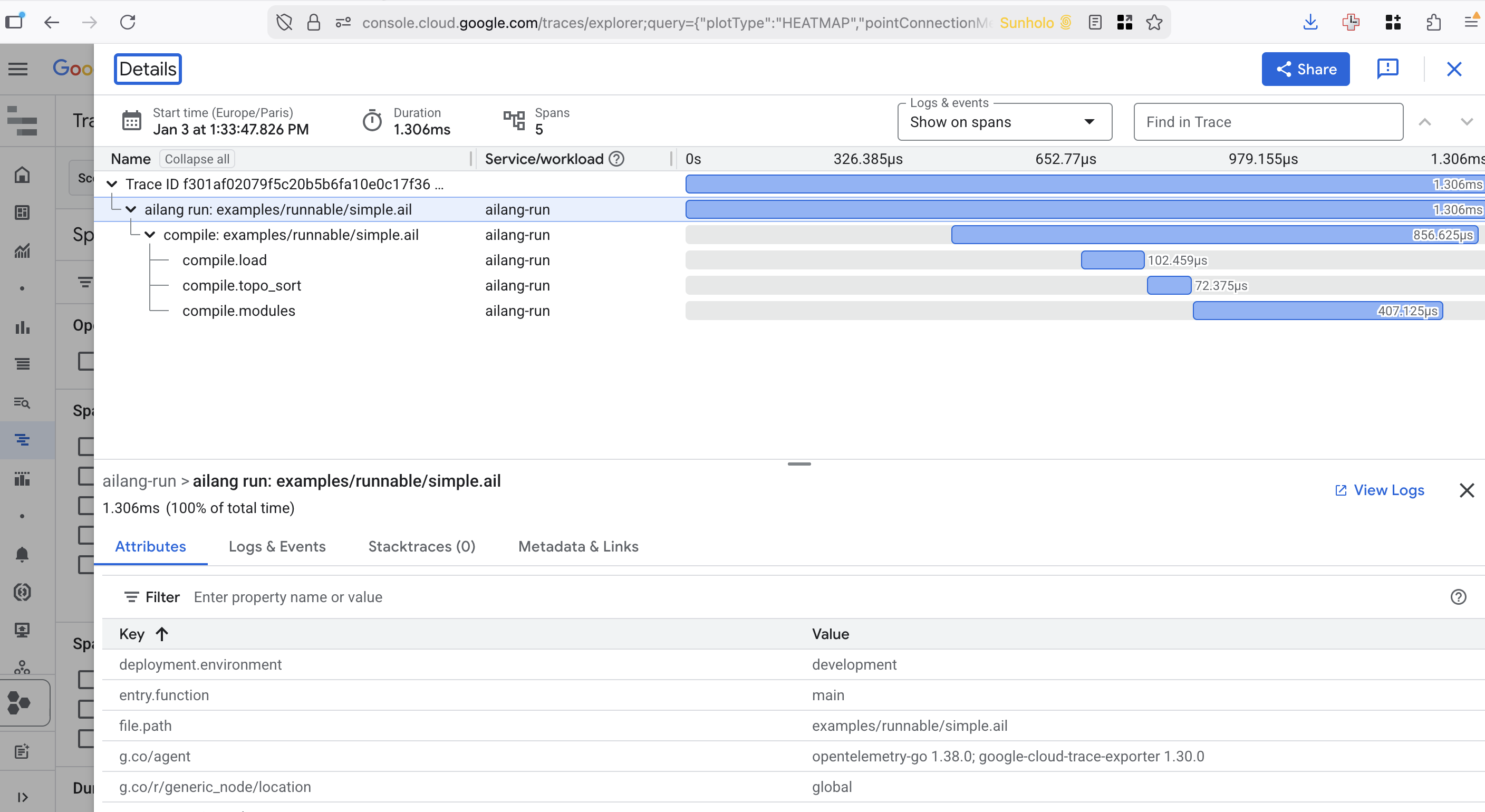
Enable by setting GOOGLE_CLOUD_PROJECT:
export GOOGLE_CLOUD_PROJECT=your-project-id
ailang coordinator start
For complete telemetry configuration (OTLP, Jaeger, dual export), see the Telemetry Guide.
Cloud Mode (v0.9.0+)
The coordinator can run on Google Cloud Run for 24/7 operation without a developer's laptop. Cloud mode replaces local SQLite with Firestore, local polling with Pub/Sub push endpoints, and local task execution with Cloud Run Jobs.
Architecture
┌───────────────────────────────────────────────────────────────────────┐
│ Cloud Run Service: Coordinator (min_instances=0, scale-to-zero)       │
│                                                                       │
│  ┌──────────────┐  ┌──────────────┐  ┌──────────────┐  ┌──────────┐ │
│  │ Health Server│  │ Push Handler │  │ Webhook      │  │ Cloud    │ │
│  │ GET /health  │  │ POST /pubsub/│  │ POST /github/│  │Dispatcher│ │
│  │ GET /status  │  │ push         │  │ webhook      │  │(CloudRun │ │
│  └──────────────┘  │ POST /pubsub/│  │ (HMAC auth)  │  │ Jobs)    │ │
│                     │ completions  │  └──────────────┘  └──────────┘ │
│                     └──────────────┘         │                │      │
│                            │                 │                │      │
│                            ▼                 ▼                ▼      │
│                      ┌──────────┐    ┌──────────┐    ┌──────────────┐│
│                      │ Firestore│    │ GitHub   │    │ Cloud Run Job││
│                      │ (state)  │    │ (labels) │    │ agent-executor││
│                      └──────────┘    └──────────┘    └──────────────┘│
└───────────────────────────────────────────────────────────────────────┘
Environment Variables
| Variable | Purpose | Default |
|---|---|---|
COORDINATOR_MODE | Set to cloud to enable cloud mode. Validated against the storage plane at start-up: cloud requires the coordinator AND messaging stores in Firestore (AILANG_STORAGE=gcp), else the daemon refuses to start naming what to set. Unset is local on ANY plane — the rig runs a local-execution daemon on AILANG_STORAGE=gcp | local |
AILANG_CLOUD_PROJECT | GCP project ID for Pub/Sub, Firestore, Cloud Run Jobs | (required) |
AILANG_CLOUD_REGION | GCP region for Cloud Run Jobs | europe-west1 |
AILANG_TOPIC_PREFIX | Pub/Sub topic prefix and job name prefix | ailang |
AILANG_WORKSPACE | Workspace identifier for multi-project routing | default |
AILANG_REPO_URL | Git repo URL passed to Cloud Run Jobs | (optional) |
PORT | HTTP port for health server (Cloud Run sets this) | (Cloud Run auto-sets) |
AILANG_CONFIG | Path to coordinator config file | ~/.ailang/config.yaml |
GITHUB_WEBHOOK_SECRET | HMAC-SHA256 secret for webhook signature validation | (optional) |
Cloud Logging
In cloud mode, the coordinator logs to both the log file and stderr. Cloud Run ingests stderr into Cloud Logging, making all coordinator activity visible in the GCP Console.
// Automatic in cloud mode — no configuration needed
if os.Getenv("COORDINATOR_MODE") == "cloud" {
    writer = io.MultiWriter(logFile, os.Stderr)
}
Push Endpoints (M-CLOUD-PUSH)
Cloud Run uses Pub/Sub push subscriptions instead of pull goroutines. Two HTTP endpoints receive messages:
| Endpoint | Pub/Sub Subscription | Purpose |
|---|---|---|
POST /pubsub/push | ailang-messages-coordinator | Incoming task messages |
POST /pubsub/completions | ailang-completions-coordinator | Task completion notifications |
Push endpoints acknowledge messages with HTTP 200 (success) or HTTP 500 (retry). Malformed messages return HTTP 200 to prevent infinite retry loops.
Immediate dispatch: The push handler calls pollAndProcessTasks() + executeTaskQueue() inline after processing each message — no 30s ticker delay.
GitHub Webhook Handler (M-CLOUD-WEBHOOK)
In cloud mode, a GitHub webhook endpoint replaces three polling goroutines:
| Replaced Goroutine | Polling Interval | Webhook Event |
|---|---|---|
| ApprovalWatcher | 60s | issues/labeled |
| GitHub sync | 5min | issues/opened |
| Label resync | 1hr | issues/labeled |
Endpoint: POST /github/webhook
Authentication: HMAC-SHA256 signature validation via GITHUB_WEBHOOK_SECRET environment variable. GitHub signs every webhook payload — the coordinator validates the signature before processing.
Supported events:
issues/labeled— Detects approval labels (design-approved,sprint-approved,merge-approved,needs-revision, and config-driven labels). Routes through the samehandleEvent()code path as the polling watcher.issues/opened— Imports the issue as a message and immediately dispatches to the configured agent.ping— Returns 200 (GitHub connectivity check).
Bot filtering: Events from bot senders ("type": "Bot") are skipped to prevent infinite loops when the coordinator adds its own labels.
Safety net: A 5-minute catch-up ticker still runs in cloud mode for edge cases, but all primary work arrives via push endpoints and webhooks.
Setup per watched repo:
gh webhook create --repo sunholo-data/ailang \
  --events issues \
  --url "https://<coordinator-url>/github/webhook" \
  --secret "<webhook-secret>"
Cloud Run Job Dispatch (M-CLOUD-DISPATCH)
When a task is ready for execution, the coordinator dispatches it to a Cloud Run Job via the CloudDispatcher interface:
dispatchTasksCloud()
    ├── 1. Mark task as "queued"
    ├── 2. Publish to Pub/Sub tasks topic (audit trail)
    └── 3. Call d.cloudDispatcher.Dispatch(ctx, params)
            │
            ▼
        CloudRunJobDispatcher.Dispatch()
            ├── Build job name: {prefix}-agent-executor
            ├── Set 7 env var overrides per execution
            └── client.RunJob(ctx, request)
                    │
                    ▼
                Cloud Run Job starts → execute-job → completion → Pub/Sub
Dispatcher interface (allows swapping backends):
// CloudDispatcher triggers remote task execution.
type CloudDispatcher interface {
    Dispatch(ctx context.Context, params DispatchParams) error
}

type DispatchParams struct {
    TaskID    string  // Coordinator task ID
    AgentID   string  // Target agent (e.g., "sprint-executor")
    Workspace string  // Working directory
    Provider  string  // "claude" or "gemini"
    Directive string  // Task prompt
    RepoURL   string  // Git repo URL
    Branch    string  // Base branch
}
Current implementation: internal/dispatch/cloudrun/ — calls Cloud Run Jobs Admin API v2 with per-execution container environment variable overrides.
Future implementations: The interface supports Kubernetes Jobs, AWS Lambda, or local process dispatchers without changing the coordinator.
Job naming: The Cloud Run Job name follows the pattern projects/{project}/locations/{region}/jobs/{prefix}-agent-executor, matching the Terraform definition in ailang-multivac/terraform/cloud_run_jobs.tf.
Cloud Run Job Environment
The Cloud Run Job receives these environment variables per execution:
| Variable | Source |
|---|---|
AILANG_TASK_ID | Coordinator task ID |
AILANG_AGENT_ID | Target agent (from task routing) |
AILANG_WORKSPACE | Working directory for the task |
AILANG_PROVIDER | AI provider ("claude" or "gemini") |
AILANG_DIRECTIVE | Task prompt/content |
AILANG_REPO_URL | Git repository URL |
AILANG_BRANCH | Base branch for the task |
The job runs ailang coordinator execute-job, which reads these variables, clones the repo, and executes the task. On completion, it publishes results to the ailang-completions Pub/Sub topic.
Terraform Infrastructure
The cloud infrastructure is defined in ailang-multivac/terraform/:
| File | Resources |
|---|---|
cloud_run.tf | Coordinator + dashboard Cloud Run services |
cloud_run_jobs.tf | Agent executor Cloud Run Job |
pubsub.tf | 5 topics, 6 subscriptions (with push config) |
iam.tf | roles/run.developer for coordinator SA |
secrets.tf | API keys + GITHUB_WEBHOOK_SECRET |
firestore.tf | Firestore database for task/message state |
Local vs Cloud Mode Comparison
| Feature | Local Mode | Cloud Mode |
|---|---|---|
| Message transport | SQLite polling | Pub/Sub push endpoints |
| Task state | SQLite (coordinator.db) | Firestore |
| Message state | SQLite (collaboration.db) | Firestore |
| Task execution | Local worktrees + CLI | Cloud Run Jobs |
| Event broadcasting | HTTP to localhost | Pub/Sub events topic |
| Logging | File only | File + stderr (Cloud Logging) |
| Git worktrees | Per-agent worktree managers | Skipped (agents have git) |
| GitHub approvals | Polling (60s ApprovalWatcher) | Webhook (real-time) |
| Scaling | Always on | Scale-to-zero (min_instances=0) |
| Availability | Laptop must be on | 24/7 (wakes on push/webhook) |
Feedback Cost & Abuse Gate (M-FEEDBACK-TRIAGE-GATE + Cloud Adapter)
The coordinator's cloud dispatch path (Pub/Sub feedback → CreateTask → agentic
fan-out) is protected by an opt-in cost & abuse gate. A flood of rule-passing
submissions could otherwise fan out to expensive Sonnet runs. The gate runs four
stages in order, each cheaper first:
- Deterministic rules (pure, <1ms): auto-prefix authorization, body-size, spam patterns, sender allowlist, known inbox/category.
- Per-contact cooldown (Firestore sliding window): caps dispatches per contact per hour/day.
- Last-resort classifier (Anthropic Haiku): only for heuristic-flagged messages; screens prompt-injection / low-value / miscategorized.
- Daily budget (Firestore counter): caps classifier spend; over budget the classifier short-circuits to file (never a dispatch flood).
The gate is off by default — existing deployments see zero behavior change
until they explicitly enable it. Stages 2–4 only run live in cloud mode
(AILANG_STORAGE=gcp|hybrid), where the coordinator constructs the Firestore
stores and the real classifier at startup. In local mode the injected deps stay
nil and the gate runs rules-only.
Enablement runbook (DRY-RUN first)
Do not flip straight to enforcement. Run a shadow week first so false positives surface in an audit inbox instead of silently suppressing real feedback.
Week 1 — shadow / dry-run. Keep the gate logic running but always dispatch:
export AILANG_FEEDBACK_GATE_DRY_RUN=1     # run the gate, audit the verdict, dispatch anyway
# (coordinator.feedback_gate.enabled: true in ~/.ailang/config.yaml)
Every would-be suppression is written to the feedback-gate-audit inbox with a
DRY-RUN title prefix. Watch it for false positives:
ailang messages list --inbox feedback-gate-audit
Flip to enforcement once the audit stream looks clean: remove
AILANG_FEEDBACK_GATE_DRY_RUN and keep coordinator.feedback_gate.enabled: true. Non-dispatch verdicts now actually suppress (and still audit — no silent
drops).
Environment reference
| Variable | Values | Effect |
|---|---|---|
coordinator.feedback_gate.enabled (YAML) | true/false | Master switch. Off (default) = full pass-through. |
AILANG_FEEDBACK_GATE_MODE | off | file-only | full | Operator kill-switch (env wins over YAML). off = pass-through; file-only = rules + cooldown, classifier disabled; full = all stages. |
AILANG_FEEDBACK_GATE_DRY_RUN | 1/truthy | Run the gate + audit the verdict, but always dispatch. For false-positive tuning. |
ANTHROPIC_API_KEY | secret | Classifier provider. Absent ⇒ classifier fail-closed (heuristic-flagged submissions filed, never dispatched) with a loud startup warning. |
AILANG_STORAGE / AILANG_CLOUD_PROJECT | gcp/hybrid + project | Firestore backend for the cooldown + budget stores. Required for stages 2–4 to run live. |
Startup log shapes
The coordinator names the live gate stages at startup. Two shapes to expect:
Fully wired (cloud mode, key present):
Feedback gate enabled (mode=full, dry_run=false, cooldown=firestore, classifier=anthropic, budget=firestore)
Key missing (cloud mode, ANTHROPIC_API_KEY unset — fail-closed):
⚠ ANTHROPIC_API_KEY not set: feedback-gate classifier fail-closed (heuristic-flagged submissions filed, never dispatched)
Feedback gate enabled (mode=full, dry_run=false, cooldown=firestore, classifier=fail-closed, budget=firestore)
In local mode (rules-only), the log reads cooldown=none, classifier=none, budget=none.
Ops handoff (terraform)
Two housekeeping items live in the sibling ailang-multivac terraform repo, not
in this codebase (see the M-FEEDBACK-TRIAGE-GATE implemented design doc's
follow-up section for details):
- A Firestore TTL policy on the
expires_atfield of the two new collections (feedback_gate_cooldown,feedback_gate_budget). Without it, stale docs are tiny and harmless (saturation-capped), so this is housekeeping, not a correctness gate. - The
ANTHROPIC_API_KEYsecret on the coordinator Cloud Run service.
Service Management
Quick Start
# Start both services
make services-start

# Check status
make services-status

# Stop both services
make services-stop

# Restart with fresh build
make services-restart
Individual Service Control
# Server only
ailang serve           # Start server (foreground)
make serve-bg          # Start server (background)

# Coordinator only
ailang coordinator start   # Start daemon
ailang coordinator stop    # Stop daemon
ailang coordinator status  # Check status
Important: The server must be running before the coordinator for real-time streaming to work.
Your Daily Workflow
The coordinator is designed to be your autonomous coding assistant. Here's how to integrate it into your daily workflow.
Morning Routine
-
Start the services (if not already running):
make services-start -
Open the dashboard: http://localhost:1957
-
Check for pending approvals:
ailang coordinator pending -
Review and approve/reject completed work
Sending Tasks to Agents
For bug fixes:
ailang messages send coordinator "Fix the null pointer bug in parser.go" \
  --title "Bug: Parser NPE" --from "user" --type bug
For new features:
ailang messages send design-doc-creator "Add support for semantic caching" \
  --title "Feature: Semantic Cache" --from "user"
With GitHub issue tracking:
ailang messages send coordinator "Fix issue described in #42" \
  --title "Bug: Fix #42" --from "user" --type bug --github
Reviewing Agent Work
When agents complete tasks, they request approval. You can review via:
Dashboard (Recommended):
- Open http://localhost:1957
- Click on Task Execution tab
- Review git diff
- Approve or reject with notes
CLI (Alternative):
# List pending approvals
ailang coordinator pending

# View the diff
ailang coordinator diff <task-id>

# Approve (merges changes to dev branch)
ailang coordinator approve <task-id>

# Reject (preserves worktree, discards changes)
ailang coordinator reject <task-id>
Decision Making
When to Approve:
- Code solves the stated problem
- Tests pass (agents run tests before requesting approval)
- No obvious security issues
- Follows project conventions
When to Reject:
- Code has bugs or fails tests
- Goes beyond scope of task
- Needs human intervention
- Different approach needed
When rejecting, add a note explaining why - this helps agents improve.
Multi-Agent Pipelines
The full autonomous pipeline:
GitHub Issue
    ↓ (automatic import)
design-doc-creator
    ↓ (YOU APPROVE design doc)
sprint-planner
    ↓ (YOU APPROVE sprint plan)
sprint-executor
    ↓ (YOU APPROVE implementation)
Changes merged to dev
Each approval gate lets you:
- Course correct before more work is done
- Ensure quality at each stage
- Maintain control over your codebase
Tips for Effective Collaboration
- Write clear task descriptions - Include file paths, expected behavior
- Break big tasks into smaller ones - Agents handle focused tasks better
- Review early, reject fast - If a design is wrong, reject before planning
- Use rejection notes - Help agents understand what went wrong
- Trust but verify - Always review diffs before approving
Troubleshooting
Daemon Won't Start
# Check if already running
ailang coordinator status

# Check PID file
cat ~/.ailang/state/coordinator.pid

# Remove stale PID file
rm ~/.ailang/state/coordinator.pid
Tasks Not Executing
# Check for unread messages
ailang messages list --unread

# Check which inboxes are configured
cat ~/.ailang/config.yaml | grep inbox

# Check coordinator logs
tail -100 ~/.ailang/logs/coordinator.log

# Verify providers are available
which claude  # Claude Code CLI
Approvals Not Showing
# Check pending approvals via API
curl http://127.0.0.1:1957/api/coordinator/pending | jq

# Check task status
sqlite3 ~/.ailang/state/coordinator.db \
  "SELECT id, title, status FROM tasks ORDER BY created_at DESC LIMIT 5"
Git Merge Conflicts
When approving changes that conflict:
- Approval returns error with conflict files
- Worktree is preserved at
~/.ailang/state/worktrees/coordinator/<task-id>/ - Manually resolve conflicts in the worktree
- Commit and merge manually
See Also
- Agent Messaging - How to send messages
- Collaboration Hub - Web UI for monitoring
- Development Workflow - Integration with development